- About this manual
- Login
- Menu
-
File list
- File list
- Upload files
- Preview
- Shortcuts and Right-Click
-
File Distribution
- About Email text
- About security settings
- Send from own mailer
- Email to Receiving (collecting) and distribution
- About Email text of the Email to collect and distribute
- About security settings of the Email to collect files and distribute files
- Notification of file and collection Email send from own mailer
- Check on how many people the file was sent
- Group sharing folder function
- Folder publication
- Display thumbnail image function
- Receive (collect)
- Gathering(※Option)
- Mail standby
- Address book
- Approval list(※Option)
- History
- Settings
- Profile
- Support
- Help
- Download files
- Upload files
Menu
The Menu is as below.

| Logo | The logo of WebFile. | Help | Open the page of the manual that you are operating the system now. |
|---|---|
| Support | Send Email to the Support. |
| File list | The list of files which are uploaded. You can operate these files just like distribute to someone, move into another folder and so on. |
| Receive (collect) | The list of files which are collected from someone. In this area, you can collect files, save files into the list and operate with collected files. |
| Gathering (※option) |
The list of gathered files. You can perform operations related to gathering, such as gathering files using a destination file in CSV format and checking the history of gathering. |
| Mail standby | It is a list of transmission standby mail. |
| Address Book | Management your address book on the system. |
| Approval list (※option) |
Users can check the status of the email that need to approved by the superior to be sent. |
| History | The list of operating history of a user and a list of file management history. |
| Settings | Management the function of the WebFile. You can create and edit Email templates and signatures. |
When you put the cursor on your account name, the submenu will open.
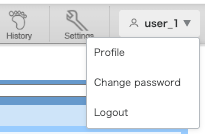
| Profile | Check your profile information, such as your registered Name and Email address. |
|---|---|
| Change password | Change your password. |
| Logout | Logout the system. |