- About this manual
- Login
- Menu
-
File list
- File list
- Upload files
- Preview
- Shortcuts and Right-Click
-
File Distribution
- About Email text
- About security settings
- Send from own mailer
- Email to Receiving (collecting) and distribution
- About Email text of the Email to collect and distribute
- About security settings of the Email to collect files and distribute files
- Notification of file and collection Email send from own mailer
- Check on how many people the file was sent
- Group sharing folder function
- Folder publication
- Display thumbnail image function
- Receive (collect)
- Gathering(※Option)
- Mail standby
- Address book
- Approval list(※Option)
- History
- Settings
- Profile
- Support
- Help
- Download files
- Upload files
Address book
This is your address book. When you want to distribute or collect file, you can select the address that you want to send your file from the address book. You can enter the address easily without miss typing.
Please click Menu:Address book.

Address book
Please click Menu:Address book, the address list will appear.
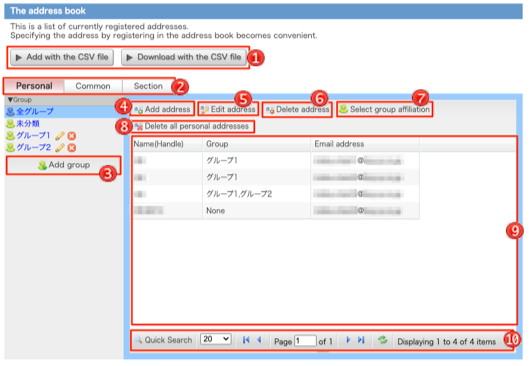
On the left side, there is a list of groups. If you click a group, addresses that is belonging to the group will appear on the right.
The group that you see their addresses now have  mark and its back color is different from others.
 Add with Add with the CSV file |
You can enter the new address to this address book with the CSV file.You can download the address to this address book with the CSV file. (→CSV Add with the CSV file, CSV Download with the CSV file) |
||||||||||||||||||||||||
|---|---|---|---|---|---|---|---|---|---|---|---|---|---|---|---|---|---|---|---|---|---|---|---|---|---|
 Private/Common/Section Private/Common/Section |
You can switch the address book type. When you set not to display the commons, you can register to email addresses other than the commons. When you set not to display the section address book, you can register to email addresses other than the section address book. Only an individual mail address can be registered when setting not to display commons and the section address book. When you select section address book, groups are displayed by section. |
||||||||||||||||||||||||
 Add group Add group |
To add group, area to enter the new group will appear.(→Add group) | ||||||||||||||||||||||||
 Add address Add address |
To add address, area to enter the new address will appear.(→Add address) | ||||||||||||||||||||||||
 Edit address Edit address |
You can edit address that you want to edit. Please select the address you want edit from the address list, and click here. You can edit only one address at once. (→Edit address) | ||||||||||||||||||||||||
 Delete address Delete address |
If you want to delete address from address book, please select the address you want to delete, and click here. (→Delete address) | ||||||||||||||||||||||||
 Select group Select groupaffiliation |
You can change the group of the address. (→Change group of address) When you select section address book, [Copy to other section group] button is displayed too.(→Copy to other section group) |
||||||||||||||||||||||||
 Delete all addresses Delete all addresses |
You can delete all addresses from the address list.(→Delete address) | ||||||||||||||||||||||||
 Mail address list Mail address list |
The list of mail addresses is displayed.
|
||||||||||||||||||||||||
 Search SearchAddress |
|




